Ultimate Guides to Mobile Photography Techniques
Master top mobile photography techniques in 2025 with pro tips, tricks, and expert advice for stunning smartphone photos.
In today’s world, mastering mobile photography techniques is a game-changer for anyone eager to capture stunning images without carrying bulky equipment. Whether you’re a casual snapper or an aspiring pro, this ultimate guide brings you the best mobile photography techniques in 2025 to elevate your smartphone shots to a whole new level.
Why Mobile Photography Techniques Matter in 2025
The Rise of Smartphone Cameras
Smartphone cameras have evolved dramatically over the last decade. From simple point-and-shoot devices, they now rival professional cameras with multiple lenses, larger sensors, and AI-powered enhancements. According to CNET, many flagship smartphones pack capabilities once reserved for DSLRs, making them indispensable for mobile photographers.
Impact on Social Media and Content Creation
The surge in social media platforms like Instagram, TikTok, and Pinterest demands high-quality visual content. Knowing the right mobile photography techniques can dramatically boost engagement, personal branding, and content quality, as supported by TrendHunter’s analysis.
Essential Mobile Photography Techniques You Need to Know
Understanding Your Smartphone Camera
Camera Modes and Settings
Modern smartphones come with diverse modes like portrait, panorama, night mode, and pro/manual. Experimenting with these unlocks new creative possibilities. For instance, Apple’s ProRAW lets you capture high-detail photos, perfect for editing.
Sensor Size and Lens Quality
Sensor size plays a huge role in image clarity and low-light performance. While smartphones can’t match full-frame sensors, phones like the Samsung Galaxy S23 Ultra offer large sensors and variable apertures for sharper shots.
Mastering Composition Techniques
Rule of Thirds and Leading Lines
Applying the rule of thirds helps place your subject off-center for a natural look, while leading lines guide viewers’ eyes through the photo. Most smartphone cameras provide grid overlays to assist with this.
Framing and Perspective
Change your shooting angle or use natural frames (like windows or arches) to add depth and intrigue. Don’t be afraid to get low or shoot from above to create unique perspectives.
Advanced Mobile Photography Techniques
Using Manual Controls
ISO, Shutter Speed, and Focus
Manual controls give you power over exposure and sharpness. Lower ISO reduces noise, slower shutter speeds can create motion blur, and precise focus ensures your subject pops.
Leveraging HDR and Night Modes
HDR balances highlights and shadows for realistic images, while night modes use longer exposure and AI to brighten dark scenes without losing detail. Phones like Google Pixel 8 Pro excel in these areas.
Creative Use of Portrait and Macro Modes
Portrait mode blurs backgrounds for professional-looking shots, and macro mode reveals tiny details in close-ups. Use them to diversify your portfolio with sharp, intimate photos.
Professional Mobile Photography Tips and Tricks
Stabilization and Tripods
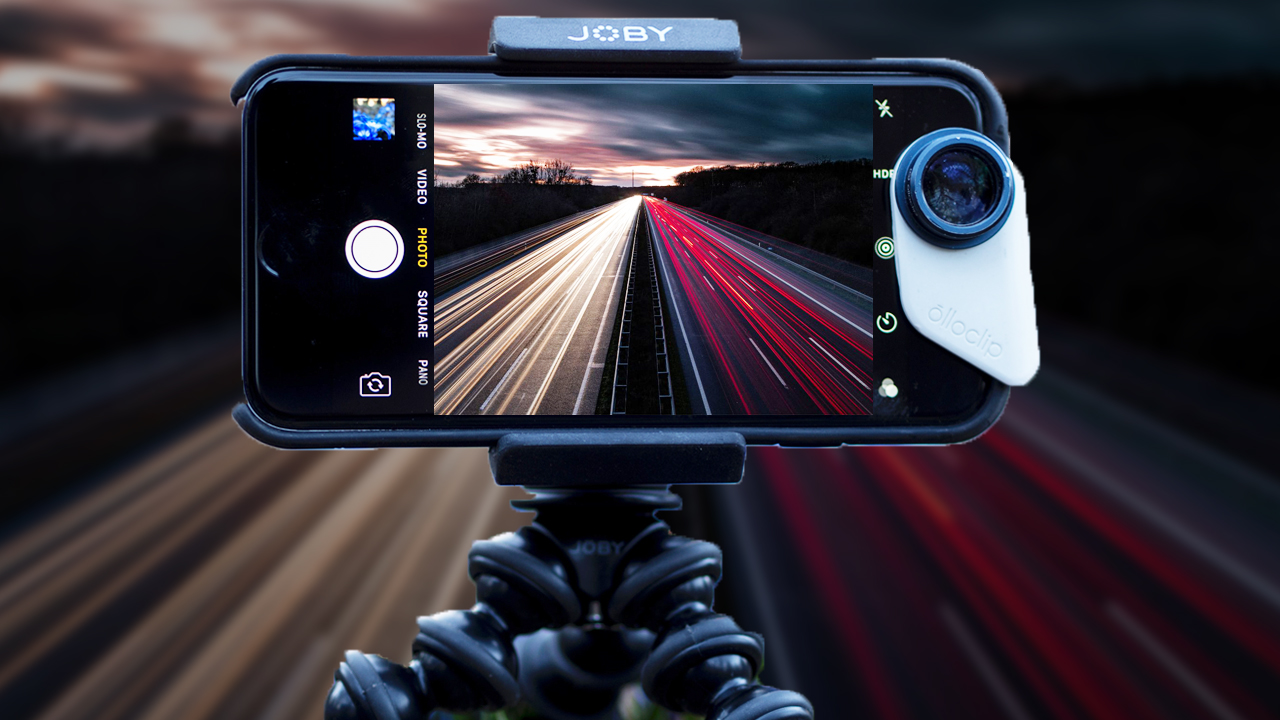
A steady shot is critical. Smartphone tripods or gimbals reduce shake, especially in low-light or video scenarios. Brands like Joby and DJI offer compact options ideal for mobile shooters.
Lighting Techniques and Using Natural Light
Natural light is your best friend. Shoot during golden hours (early morning, late afternoon) for soft, warm light. Use reflectors or white cards to bounce light and soften shadows.
Editing Apps and Post-Processing
Top Mobile Editing Apps
Apps like Adobe Lightroom Mobile, Snapseed, and VSCO offer powerful editing tools. They allow color correction, cropping, retouching, and applying presets that professional photographers use.
Editing Workflow Tips
Start with cropping and straightening, adjust exposure and contrast, then fine-tune colors and sharpness. Don’t over-edit—maintain natural aesthetics to keep photos authentic.
Best Accessories to Enhance Mobile Photography -(Mobile photography techniques)
External Lenses and Attachments
Add-ons like Moment lenses provide wide-angle, telephoto, or macro capabilities that extend your phone’s versatility. They attach magnetically or via cases.
Portable Lighting and Reflectors
Compact LED lights or ring lights improve indoor or low-light conditions. Reflectors help control natural light for portraits or product photography.
Smartphone Gimbals and Stabilizers
Devices like the DJI Osmo Mobile offer smooth video and sharper photos by stabilizing your phone during movement.
Common Mistakes to Avoid in Mobile Photography- (Mobile photography techniques)
Over-reliance on Digital Zoom
Digital zoom degrades image quality. Instead, get closer or use optical zoom lenses when possible.
Ignoring the Background
Cluttered or distracting backgrounds can ruin a great shot. Choose clean or complementary backgrounds to enhance your subject.
Poor Focus and Exposure Settings
Tap to focus on your subject and adjust exposure manually if your phone allows. Avoid blown-out highlights or underexposed shadows.
Expert Buying Tips for Mobile Photography Equipment
Choosing the Right Smartphone for Photography
Look for phones with multiple lenses, large sensors, and strong low-light performance. The iPhone 15 Pro Max, Samsung Galaxy S23 Ultra, and Google Pixel 8 Pro top this list.
Investing in Quality Accessories
Quality lenses, tripods, and lights improve your workflow and photo quality. Avoid cheap knock-offs that may harm your phone or deliver subpar results.
Future Trends in Mobile Photography Techniques
AI-powered Photography Enhancements
AI assists in scene detection, automatic adjustments, and noise reduction. Phones are becoming smarter in capturing the perfect shot effortlessly.
Computational Photography Advances
Techniques like multi-frame processing and depth mapping are pushing smartphone photography beyond hardware limitations.
Integration with Social Media Platforms
Direct editing and sharing features on social apps speed up content creation, keeping mobile photographers agile and relevant.
Conclusion: Elevate Your Photography with Mobile Techniques
Mastering mobile photography techniques transforms your smartphone into a powerful creative tool. By understanding your device, refining composition, using advanced features, and choosing the right accessories, you’ll capture stunning images that stand out. Whether you’re a hobbyist or a pro, these techniques ensure you stay ahead in the fast-evolving world of smartphone photography.
Read Also: Best Camera Phones for Photography Enthusiasts in 2025
FAQs – Mobile photography techniques
What are the essential mobile photography techniques for beginners?
Start with mastering composition, understanding camera modes, and using natural light.
Which smartphone has the best camera for mobile photography in 2025?
Flagships like the iPhone 15 Pro Max and Samsung Galaxy S23 Ultra lead in camera technology.
Can editing apps improve mobile photos significantly?
Absolutely. Apps like Lightroom Mobile allow professional-grade edits on your phone.
Are external lenses worth it for mobile photography?
Yes, they extend your phone’s capabilities for creative shots like macro and telephoto.
How can I avoid blurry photos with my smartphone?
Use stabilization tools like tripods and tap to focus properly.
Is AI really helping improve mobile photography?
Yes, AI enhances exposure, focus, and scene optimization automatically for better images.